
Contact Us Today

We’d love to discuss how we can help your business grow with a new website or online marketing campaign. Quikclicks can help you:

  • Boost your website traffic & engagement
  • Outrank your competitors in Google
  • Increase website conversions
  • Increase sales online
  • Deliver ROI on your marketing budget

Fill in your details below for a free, no obligation consultation:
(Existing Quikclicks client and need help? Please email: support@quikclicks.com.au)


Giving a company access to your Google Analytics for website tracking

Log in to Google Analytics using you Gmail account, by going to the following website address:
https://marketingplatform.google.com/about/analytics/

NOTE: If you can not see the website address profile for the website you wan to give access to, then it usually means you have logged in with the wrong Google/Gmail account

Once you have logged in, follow the steps below:

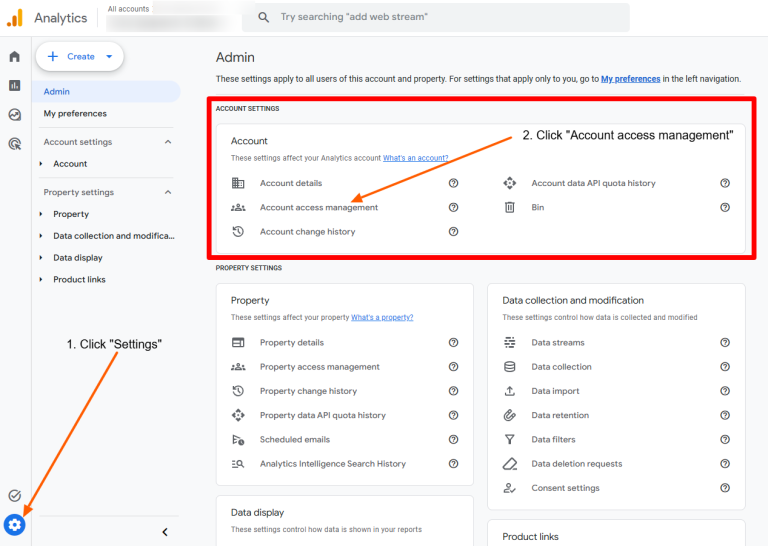
  1. Click the blue “ADMIN” gear icon in the bottom left corner of the screen
  2. Go to the Account section and click on “Account access management”
    Giving a company access to your Google Analytics for website tracking - screenshot 1
  3. Click the blue “add” button, select Add user.
    Giving a company access to your Google Analytics for website tracking - screenshot 2
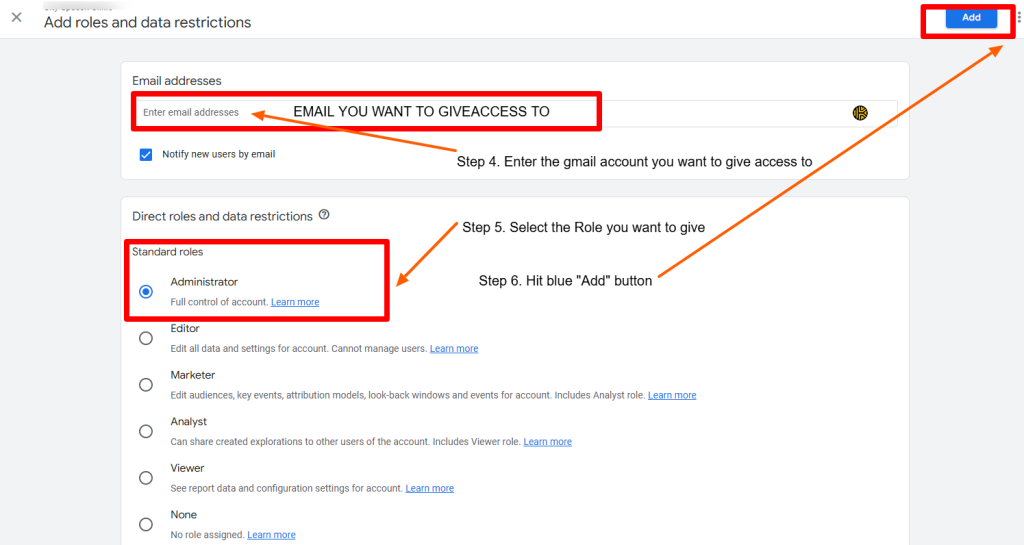
  4. Add in the Gmail address you want to give access to, select the Role you want to give that user, then click ‘Add’
    Giving a company access to your Google Analytics for website tracking - screenshot 3
Was this article helpful?

Free Consultation

Book in an obligation free call and we’ll share our expertise on whatever you need help with whether it’s web design, updates and support or marketing your business online.


Enquire now to find out more